
Writing lessons
One piece of writing, like an argument or a story, in five steps: Plan, Draft, Improve, Edit, and Final, with the tutor's help along the way.
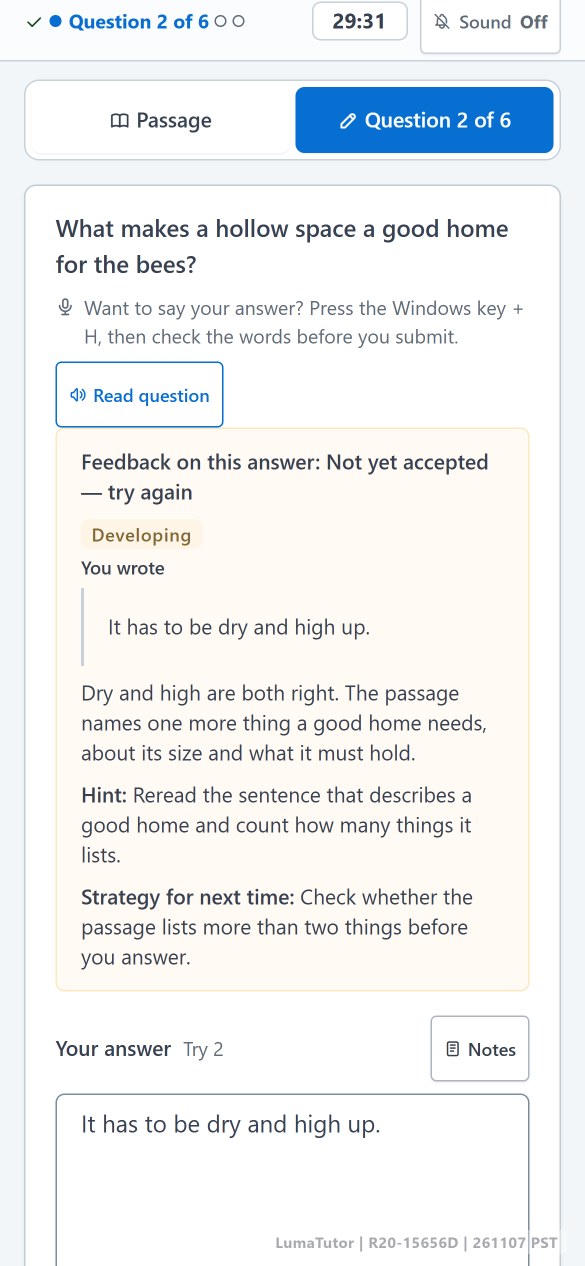
In each lesson your child reads a passage and answers one question at a time. After every answer they see what worked, what is missing, and a hint, then get one more try instead of the answer. You can open any lesson and read exactly what they wrote.
200 free credits at signup, enough for about 2 lessons. No card needed.
About what your child actually wrote, not just a score.
An answer that is not there yet gets a hint and one more try. A weaker try never lowers the score.
Answers, feedback, scores, and a monthly report in your parent account.
One passage, 6 to 8 questions, and a short piece of writing.
Questions move from what the passage says, to what it means, to the sentence that proves it. The passage stays beside the question, and any word can be explained and saved for review.
Each answer is rated Beginning, Developing, Proficient, or Exemplary, with what worked, what is missing, and a hint. Below Proficient, your child gets one more try.
The lesson ends with a short written response. The tutor gives specific feedback on the draft, your child revises it once, and the lesson keeps the stronger version.
Many learning apps show a streak and a score. LumaTutor shows the work.
One piece of writing, like an argument or a story, in five steps: Plan, Draft, Improve, Edit, and Final, with the tutor's help along the way.
Any word in a passage can be explained and saved. Review Words brings saved words back with the meaning hidden first.
Every finished lesson with its answers and feedback. "Another look" shows only the answers worth a second look.
For a busy day: 4 questions instead of 6 to 8, with the same writing task.
Students can listen to the passage while they read along.
Larger text, dark mode, highlighting, and notes, on any screen size.
Newer practice areas that are still growing. They appear on your child's screen when their plan and grade allow.
Practice sets at a grade 9 to 12 level. Included with paid plans; it uses no credits.
Short question sets on four skills: Boundaries; Form, Structure, and Sense; Transitions; and Words in Context. The questions are written for LumaTutor, not taken from official tests. Included with paid plans; it uses no credits.
AP Language and AP Literature lessons for grades 6 to 12, on college-level passages. Each lesson uses credits like a reading lesson.
A steady reading and writing routine, with feedback you do not have to write and a record of every lesson.
For homeschool familiesRegular reading and writing between classes or tutoring, at your child's level.
How a lesson worksLevels follow U.S. school grades. If English is your child's second language, starting a grade or two lower is normal.
For parentsEvery plan includes reading and writing lessons, the parent account, and monthly reports. Plans differ in credits and in how many children they include. Cancel any time.
LumaTutor is English reading and writing practice that parents manage. In each lesson a student reads a passage, answers questions one at a time, gets feedback and a second try, and finishes with a short piece of writing that they revise. Parents can open every lesson.
Create a parent account with your name, email, and password; no card is needed. New accounts get free credits, shown on the Plans page, which are enough for a first lesson or two. Add your child and they can start right away.
Not always. LumaTutor grades follow U.S. school reading and writing expectations. A child with less time in English may do better starting one or two grades lower. Watch the first few lessons, then change the level from the Children page.
AI helps draft passages and questions, writes the feedback on answers and drafts, and explains words. Feedback is checked by rules, for example so it does not simply give the answer away. AI can make mistakes, so its levels are practice feedback, and your child can report anything that looks wrong.
Yes. Plans renew monthly until you cancel, which you can do yourself on the Plans & Billing page. Unused monthly plan credits carry over for one month.
Create a parent account, add your child, and use the free credits for a first lesson.
200 free credits at signup, enough for about 2 lessons. No card needed.